Project Management 365 App

Project management for Business Central – plan projects, allocate resources, track time, control budgets, invoice accurately, and get dashboards with end-to-end visibility from kickoff to delivery.

Project Management 365 App

Project Management 365 App

When the work is the product, the management has to keep up
Many companies live off projects, tasks and ongoing services. Even so, the work is often handled in one system, time in another and invoicing in a third. This creates a gap between what is delivered and what is invoiced, and makes it hard to get a real overview of earnings and progress.
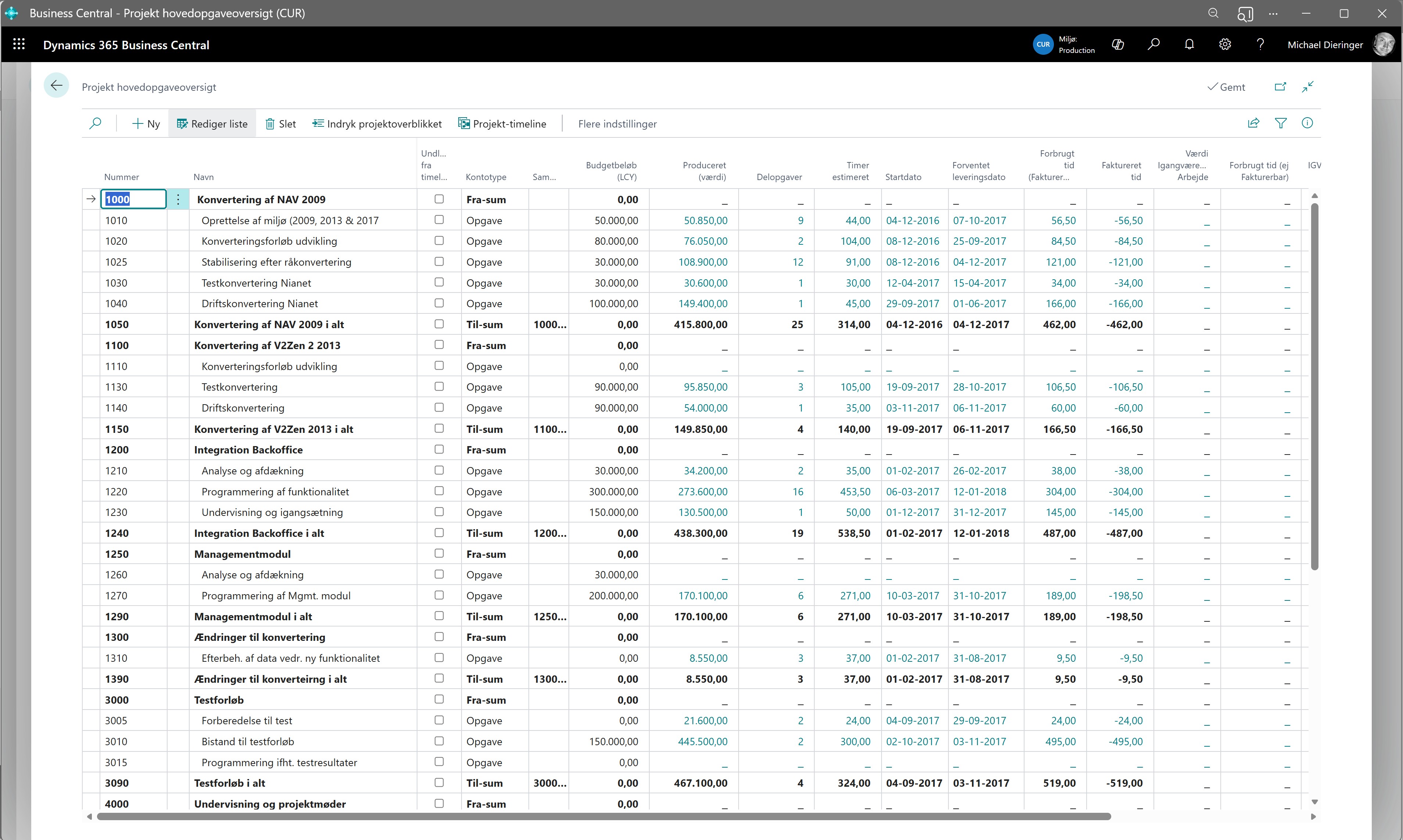
Project overview with budget
One unified overview, where tasks, progress and finances can be followed in the same view

From fragmented management to one unified platform

Traditionally, companies try to tie systems together:

  • Tasks in Jira or Excel

  • Time in a separate system

  • Invoicing in the ERP

This means the connection only appears afterwards, and often too late.

With Project Management 365, things work differently. Tasks, time and finances run directly in Business Central, on the same data model, so the connection is there from the start and not something that only appears afterwards.

Planning tool and overview

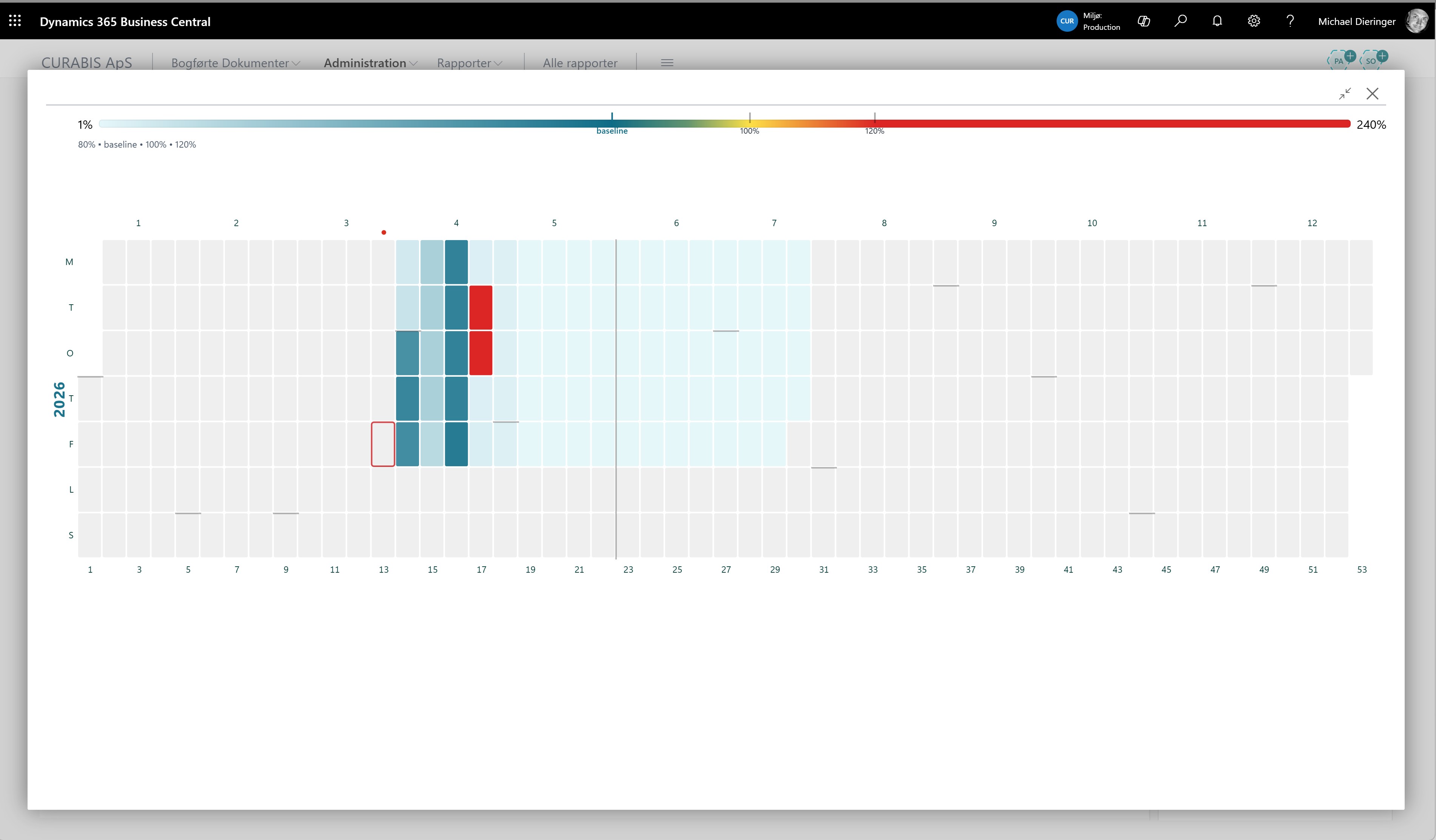
The work is distributed visually in a workload overview, where every day and week shows capacity and progress.

The focus for the day is clearly marked, and the current week gives a unified picture of the workload.

This makes it easy to see quickly where there is pressure and where there is room for new tasks.

The heatmap is used directly in planning and prioritisation, so tasks can be moved to where capacity is available. At the same time, the overview makes it easy to identify backlogs, so tasks are completed on time.
Easy and accessible time tracking

Time tracking is made simple and close to the work. You select customer, project and subtask, and time is registered directly on the task.

For those who prefer it, there is a stopwatch function that makes it possible to track time continuously throughout the day. The draft also functions as a workspace, where the day's tasks are gathered and updated as the work is carried out.

Time tracking that actually gets used in practice

Time tracking is an integrated part of the workflow. The employee selects customer, project and task, and registers time directly.

Registration can be done continuously throughout the day, either manually or via the stopwatch function. The draft also acts as a workspace, where the day's tasks are handled in one place.

This ensures high data quality and makes it possible to link the work directly to invoicing, without retroactive entries or lost hours.

Time tracking

This ensures that hours are tracked continuously and become a natural part of the work, which gives high data quality and accurate invoicing.

Transparency, also for your customer

Through the Cross Channel platform, customers can get access to their own project data and follow the work as it progresses. This creates transparency and raises the bar for the quality of the registration, because data is visible in real time.

Insight as part of operations

Data is available continuously and can be used directly in prioritisation, planning and follow-up. This provides a solid basis for everyday decisions.

Built on day-to-day operations

Power BI is based on the data already used in the work, including tasks and projects, time tracking and invoicing.

This ensures that insight is always up to date and grounded in actual operations.

PowerBI

This gives a clear picture of where the business creates value, and where adjustments need to be made.

When tasks, time and finances connect in the same solution, you get a solid foundation for running and developing the business, directly in Business Central.

Built directly into Business Central

Project Management 365 is an app for Microsoft Dynamics 365 Business Central, where project management, time tracking and invoicing are gathered in one solution.

This means that data is registered in one place and used directly through the entire process, from task to invoice.

Try it here: Microsoft Marketplace 

Book a 20-min fit-check

We map your top 3 project pain points and show where you can streamline

The Project Management 365 App is a project management solution from CURABIS built directly on top of Microsoft Dynamics 365 Business Central. The app unifies task management, time tracking, resource planning, invoicing and reporting in one data model, so project work, finances and customer invoicing connect from the start. The solution typically replaces a combination of Jira or Excel for tasks, a separate time tracking system and invoicing in the ERP, and provides real-time overview of progress, earnings and capacity. The app is available on Microsoft AppSource.

Jobs (also called Projects in English) is Business Central's built-in module for project management, covering project cards, job tasks, budgets, postings, resource usage, WIP calculation and invoicing. The module handles fixed-price projects, time and material projects, and work in progress (WIP). The Project Management 365 App extends the module with modern user interfaces for task management, capacity overview (heatmap), stopwatch-based time tracking and customer portals through Cross Channel Platform, so the Jobs module becomes usable in a modern working day.

Time tracking in Project Management 365 happens directly on the task in Business Central. The employee selects customer, project and subtask and registers time either manually or through a built-in stopwatch function that runs throughout the day. The hours are posted directly to the job in Business Central and become the basis for capacity planning, WIP calculation and customer invoicing. The day's tasks are gathered in a draft that acts as a workspace, so hours do not need to be entered retroactively and no hours are lost.

Fragmented project management means that tasks are handled in Jira or Excel, time is tracked in a separate tool such as Toggl or Harvest, and invoicing happens in the ERP. This creates a gap between what is delivered and what is invoiced, and requires manual synchronisation between systems. A unified solution such as Project Management 365 places tasks, time and finances in the same data model in Business Central, so progress, earnings and invoicing connect from the start. This eliminates duplicate maintenance, closes invoicing leaks and provides real-time overview.

WIP (Work in Progress) is the accounting value of ongoing project work that has not yet been invoiced. WIP typically consists of registered hours, materials and costs posted to a project, where invoicing only happens at milestones or project completion. In Microsoft Dynamics 365 Business Central, WIP is calculated automatically on jobs based on selected WIP methods (for example Cost Value, Sales Value, Completed Contract). Project Management 365 ensures that the WIP basis is accurate, because hours and costs are registered directly on the project in real time.

Project Management 365 draws reporting and insight from Power BI, which is built directly on the data already in Business Central, including projects, job tasks, time tracking, invoicing and customer data. Standard dashboards cover project overview, capacity utilisation, earnings per customer, WIP status and progress against budget. Because Power BI reads directly from the Business Central data model, the reports are always up to date and do not require a separate data warehouse or ETL flow. Dashboards can be tailored per role, for example project manager, finance manager or executive.

Project Management 365 is aimed at companies that live off projects, tasks and ongoing services, including consulting firms, IT companies, engineering houses, law firms, creative agencies, installation and service companies and consulting engineers. The solution is particularly relevant for companies already running or about to implement Microsoft Dynamics 365 Business Central, and who need to gather project management, time tracking and invoicing in one place, instead of integrating Jira, Toggl or Excel with the ERP.

Project invoicing in Project Management 365 is based directly on registered hours, materials and milestones on the individual job in Business Central. The solution supports time and material invoicing, fixed-price invoicing, milestone invoicing and on-account invoicing. The invoicing basis is pulled automatically from the project postings, so there is no gap between delivered work and invoiced amount. Through Cross Channel Platform, customers can access their own project data and see the basis for invoicing in real time, which reduces disputes and supports transparency.