

When AI enhances customer service in Business Central Webshop
In my latest blog post, I explained how purchase-ready product data forms the foundation for meaningful use of AI in e-commerce. When data is structured correctly, AI can support the business in ways that truly create value. That mindset does not stop at the point of purchase—it extends directly into customer service.
As a webshop grows, the number of customer inquiries grows as well. Not necessarily because something goes wrong, but simply because more orders naturally lead to more questions. Where is my order? Has it been paid? Has it been shipped? Has a refund been issued? These questions are familiar—and the answers already exist in Business Central.
The fragmented world is brought together
The challenge is that the answers are rarely found in one place. They are spread across web orders, payments, sales documents, and invoices. For customer service, this means multiple lookups, more context switching, and often a manual overview that has to be pieced together again and again.
When the same information has to be retrieved repeatedly, customer service becomes unnecessarily time-consuming. Not because the tasks are difficult, but because the overview must be assembled manually every time. This is where the tools make a decisive difference.
Customer service is improved
With better access to a consolidated order and payment status, customer service can operate more smoothly. Responses are delivered faster, inquiries are resolved immediately, and a calmer workflow is established. This creates room for both higher quality customer dialogue and more capacity in everyday work.
As the business grows, the impact becomes clear. More orders can be handled without a corresponding increase in administration, because employees have the right tools at their disposal. This is not just efficiency. It is better working conditions, better customer experiences—and yes, even time for a morning coffee.
New capabilities in Business Central SaaS
MCP is a standardized way of giving intelligent assistants access to selected business data directly within Business Central. This allows AI to ask concrete questions and receive answers based on the current ERP context, without data being moved or pre-interpreted. Business Central remains the single source of truth, while AI acts as an additional layer that conveys the answers.
The feature must be enabled in Business Central, and access is configured deliberately. You choose exactly which data can be queried and in what form responses are returned. This provides full control and makes it possible to start small—for example, with order and payment status for customer service.
At CURABIS, we work purposefully to translate this new capability into tangible day-to-day value. Just as we have focused on purchase-ready product data in the webshop, we are now exploring how MCP can be used to make customer service more streamlined and scalable. With Business Central as the foundation and clear access boundaries in place, AI becomes a natural supplement in a growing business.
In the next part, we show how the feature is enabled and how access is configured, allowing AI to be used responsibly and purposefully in customer service operations.
How access is configured in Business Central
The new functionality in Business Central is enabled through standard feature management in the SaaS environment. Once the feature is turned on, you can configure which information may be queried and in what form responses are provided.
The configuration is performed directly within Business Central and requires no external integrations or special setup. A clear purpose for the access is defined, the relevant data sources are selected, and access is set to read-only. This preserves full control while allowing the information to be used in new contexts.
This approach is precisely what makes it possible to work with AI in a structured manner. Business Central remains the central source of truth, and access is governed by business needs rather than technical considerations.
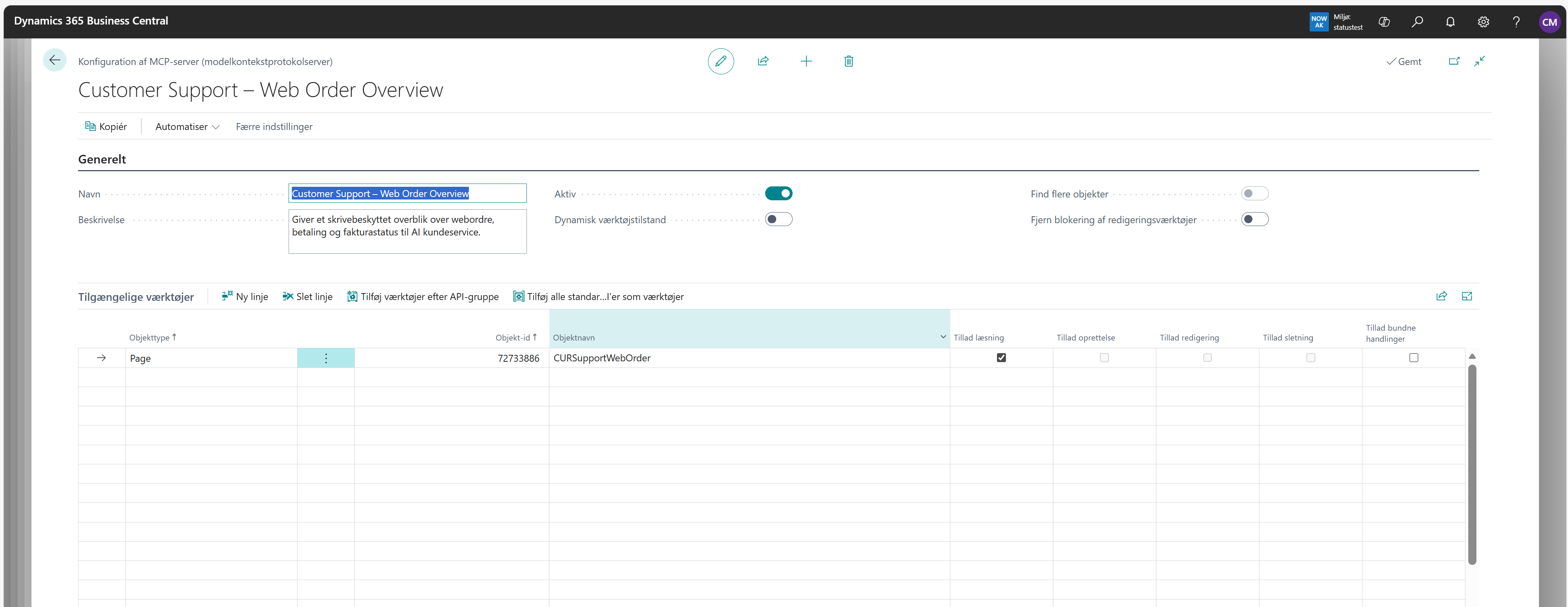
What does the web service do—from the customer’s perspective?
The web service provides a consolidated overview of a web order. When a web order number is queried, it returns a clear and up-to-date status view based on the same data that customer service would normally look up manually in Business Central.
For the customer, this means fast and consistent answers. For customer service, it means fewer lookups and less context switching. And for the business, it means that information is always based on the current situation.
The web service addresses the questions customers most frequently ask after a purchase and makes it possible to provide answers immediately.
Which information is included in the overview?
The web service aggregates relevant key information about a web order from Business Central and presents it in a clear and structured format that is ideal for AI-supported customer service.
The information is retrieved live from the system, ensuring that responses regarding order status, payment, and invoicing are always based on the current situation.
-
Web order number and order date
-
Order status based on the web order
-
Payment status, including reserved, captured, and refunded amounts
-
Invoicing overview
-
Most recent relevant update to the order
A concrete example in practice
Imagine a customer reaching out with a simple question:
“What is the status of my order?”
With the setup described, the answer can be provided immediately. The web order is looked up, the payment status is assessed, invoicing is verified, and the most recent relevant update is included—all based on data directly from Business Central.
For customer service, this means a fast and consistent response without additional lookups. For the customer, it means immediate clarity. And for the business, it means that more inquiries can be handled efficiently as revenue grows.
Stay tuned
In the next article, I demonstrate how our use case is brought to life with AI, and how the enabled functionality supports customer service with concrete, data-driven answers directly from Business Central.


